Guides · Method
How to take progress photos you can actually line up.
A progress photo is only useful next to the others. Most series go wrong not because a day was missed, but because each photo was taken a little differently, and the change you wanted to see gets lost under the changes you did not mean to make. This guide is how to keep everything the same except the thing you are tracking, shown on real series that photographers kept for years.
The one rule: change only what you are tracking
Everything in a progress photo that is not the subject is a ruler: the background, how far away the phone is, how high, which way it points, the light, the lens. Keep those the same and the eye reads every difference as the change you are tracking. Let them move and it reads them as the change instead, and the photos stop proving anything.
Coming back at the same time is the part most people work on. It is not the part that makes photos line up. Here are two series laid over themselves, each pair at half strength, with nothing else done to either:
 Same spot
 Same hour
The second series is a lovely set of photographs. As a series to compare, the moving frame is all you see. The spot and the aim are what line photos up, and both can be fixed in a minute.
Same place, same light
Pick a place you will be at every time. For a face or a beard: the same wall, with nothing behind you that changes. For a plant: the same sill, the pot in the same spot. For a room: one doorway or one corner, never the middle. Becoming's camera says the same thing in a few words over the viewfinder: “Same pot, same window.” for a plant, “Same corner, same light.” for a room.
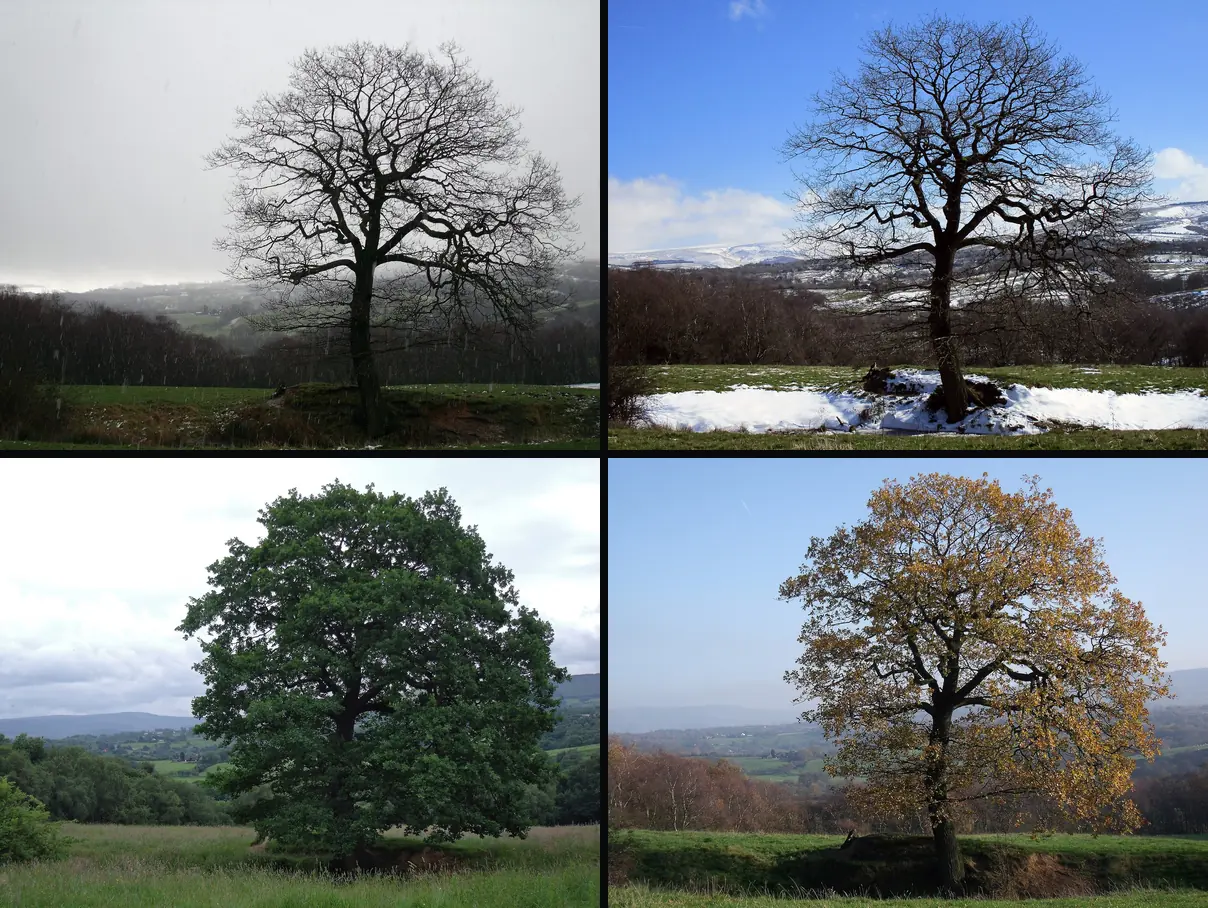
Then the light. The oak above shows what light does to a scene that did not move: grey rain, snow under a blue sky, a dull June day, low November sun. You cannot choose the weather, but you can choose the hour. Indoors, a window's light changes with the clouds and the season; one lamp, in the same place, at the same hour, does not. Light from the front or the side, never straight down from a ceiling, and the flash off. What is left over, an app can even out a little; the guide on photos into a timelapse covers how.
Same distance, height and angle
Mark the spot. A strip of tape on the floor where you stand, or where the phone goes. For a plant, two small marks on the sill for the pot and one on the pot for the side that faces you: a plant on a sill leans toward the light, and a pot turned a different way each day plays as a plant spinning.
Rest the phone on something. A shelf, a stack of books, a jar, the edge of a window frame. A hand is never in the same place twice; a stack of books is. Keep the phone at the height of what you are photographing, and straight. Becoming's camera shows a live level above the shutter, from the phone's own motion sensor: “level” within 2°, and beyond it which way to straighten, such as “tilted 3° right”.
Same lens, same camera, same shape. Phones with several lenses switch between them; pick 1× and stay on it, and move closer instead of zooming. Never mix the selfie camera and the back camera in one series: a selfie is a mirror image, and nothing Becoming does to line photos up (moving them, and for a face turning and scaling them) can undo a mirror. Becoming remembers which camera a project uses, and if you switch, it says so before you shoot: “The rest of this project is on the selfie camera. These will not line up.” And decide once between upright and sideways.
Doing it alone
Most progress photos are taken by one person, with no one to hold the phone. Two ways work.
A stand and the self-timer. Put the phone on its mark, set your camera app's timer to 3 or 10 seconds, and step onto your tape. It works, and it is how most people start. Its weak spot is that you cannot see the frame while you are in it, so take a test photo first and check it against the last one.
Yesterday's photo over the viewfinder. The camera fades your last photo over the live view, and you move until the two match: the outline of the pot over the pot, your eyes over your eyes. It turns lining up from a guess into something you can see, and it is what Becoming's camera is built around.
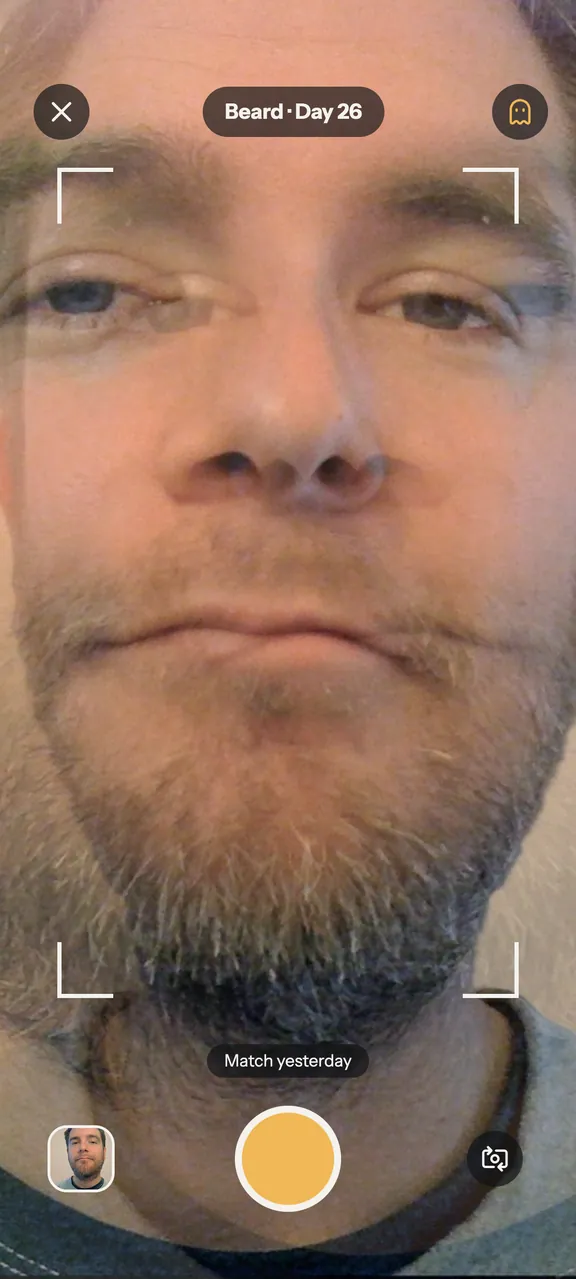
After that, the app does the rest of the lining up: on a face it finds the eyes, nose and mouth and moves each photo so they land in the same place; on a plant or a room it compares what is in each photo and shifts it into line where it finds a match, as far as the photo's edges allow. It can move a photo. It cannot turn your head or walk the phone back to yesterday's spot, which is why the marks above matter.
How often
Match the photo to how fast the thing changes, not to how keen you feel on day one:
- Every day for what changes in days: a beard, seedlings, a bud opening over a week.
- Once a week for what changes in weeks or months: a room being done up, a garden, a build.
- Once a month for what changes in seasons: a tree, a view, a hedge.
More photos make a longer video, but not by as much as you might think: at Auto, the pace a first video starts on, each photo gets a little less time as there are more. In Becoming, a photo a day for a month makes a first video of 21 s; a photo a week for a year makes one of 28.9 s. The timelapse length calculator works it out for any rhythm. Pick the one you will actually keep: a weekly series that lasts a year beats a daily one that stops in week two.
When you miss a day
Nothing breaks. A series is a set of dated photos, and a missed day is only a longer step between two of them. The beard month on this site is 9 photos across 26 days, and it still plays as one month.
Becoming is built the same way. It counts days from your first photo, and its calendar and the card at the end of each video count the days with a photo, not the days without one. If you will be away, switch on Away in the reminders for that project, and those days are counted as away, not missed. The daily reminder eases off when it is ignored: to every other day after 3 unanswered, to once a week after 6. Take a photo and it goes back to daily.
Keep them yours
Progress photos are private by nature: a face on a bad day, a room mid-mess, a project you are not ready to show. Becoming keeps them on the phone, with no account, and makes the video there too. Nothing is posted until you post it.
Then put them side by side
Two photos make a before and after: the before and after maker lines them up by hand in your browser. Three to twelve make a grid: the week-by-week photo grid sorts them by the date they were taken and labels each one. A whole series makes a video, and photos into a timelapse covers why it shakes, why it flickers, and how fast it should play.